
Risk is part of every business process. A supplier may deliver late. A machine may fail during production. A document may be used after it has expired. A new employee may miss a required training step. A customer complaint may reveal a deeper process weakness. In a well-managed organization, these risks should not remain hidden until they become non-conformances, audit findings, safety incidents, or customer dissatisfaction.
This is where a risk register becomes essential.
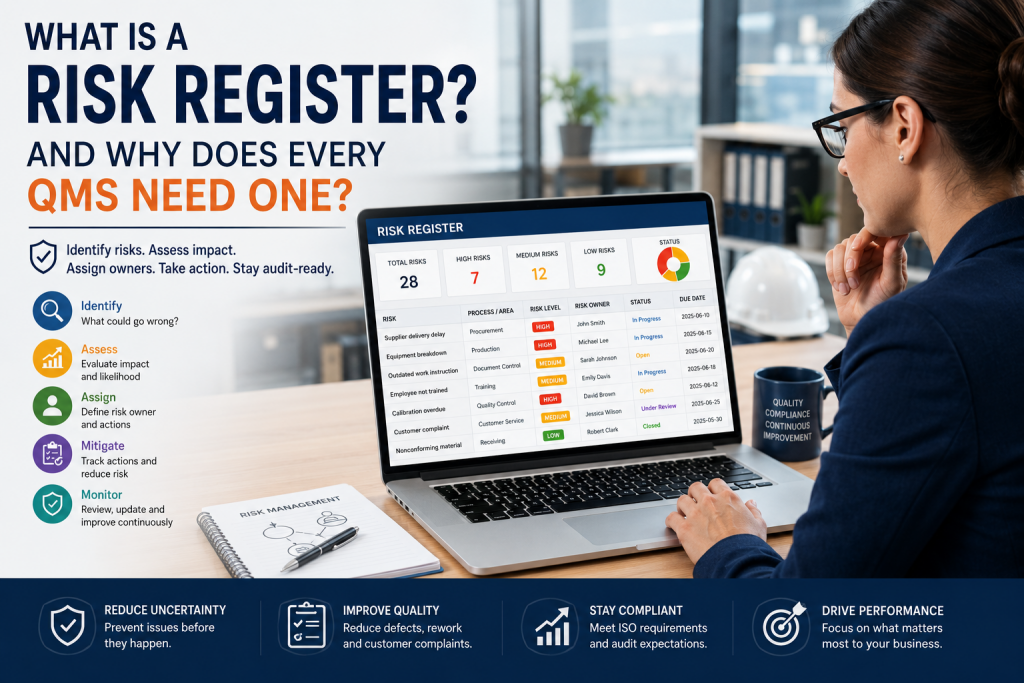
A risk register is a structured tool used to identify, assess, prioritize, assign, and monitor risks. In a Quality Management System, or QMS, it helps organizations move from reactive problem-solving to proactive risk-based thinking. Instead of waiting for quality issues to happen, companies can document possible risks, evaluate their impact, assign ownership, create mitigation actions, and review progress over time.
For manufacturers, food companies, service providers, laboratories, construction companies, and other regulated or process-driven organizations, a risk register is more than a simple list. It becomes a central part of quality planning, audit readiness, operational control, and continuous improvement.
What Is a Risk Register? #
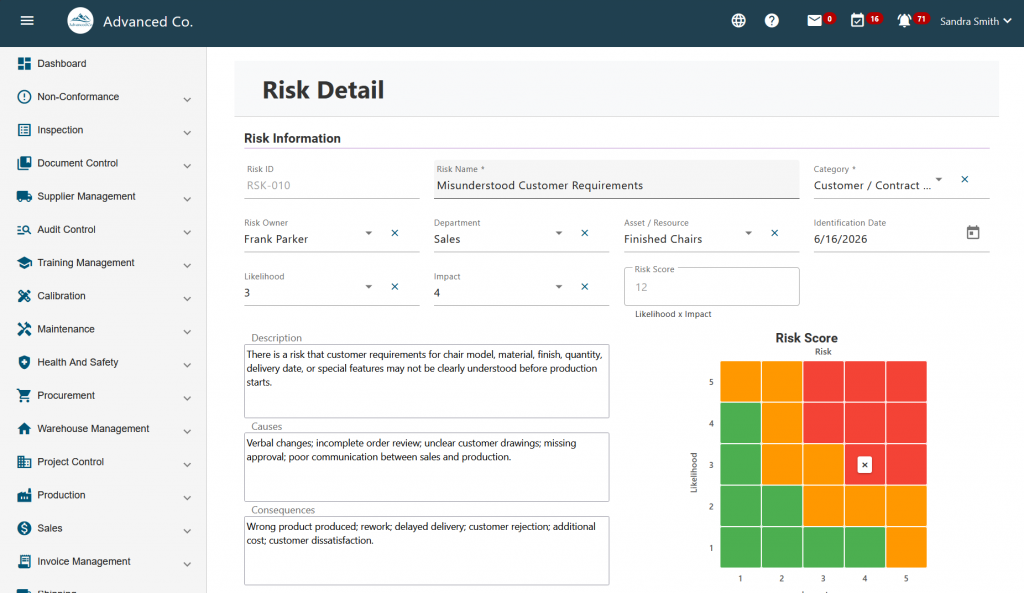
A risk register is a formal record of identified risks within an organization, department, process, project, product, or management system. It usually includes key information such as the risk description, possible causes, consequences, severity, likelihood, risk level, responsible person, mitigation plan, action items, due dates, status, and review history.
In simple terms, a risk register answers these questions:
- What could go wrong?
- Why could it happen?
- How serious would the impact be?
- How likely is it to happen?
- Who is responsible for managing it?
- What actions are needed to reduce the risk?
- Has the risk been reviewed and controlled?
A basic risk register can be created in a spreadsheet. However, as the organization grows, spreadsheet-based risk registers often become difficult to control. Different departments may use different versions. Risk owners may forget to update their actions. Review dates may be missed. Evidence may be stored in emails, folders, or disconnected documents. During an audit, it may become difficult to prove that risks were actively managed.
A digital risk management system solves many of these problems by centralizing the risk register, assigning responsibility, standardizing risk scoring, tracking mitigation tasks, and keeping records available for audits.
Why Risk Registers Matter in a QMS #
A Quality Management System is designed to help organizations consistently meet customer, regulatory, and internal requirements. Risk management supports this goal by helping the organization identify potential failures before they affect product quality, service delivery, safety, compliance, or customer satisfaction.
In a QMS, a risk register can support several important objectives:
- It helps prevent recurring non-conformances.
- It supports better decision-making.
- It improves audit readiness.
- It creates accountability for risk owners.
- It connects risk management with corrective actions.
- It helps prioritize limited resources.
- It supports continuous improvement.
- It gives management better visibility into business-critical issues.
Without a risk register, risk management often becomes informal. People may discuss risks in meetings, but the decisions are not always documented. Corrective actions may be assigned, but follow-up may be inconsistent. Senior management may not have a clear view of which risks are increasing, which risks are under control, and which risks require urgent attention. A QMS risk register provides structure, visibility, and discipline.
Common Examples of Risks in a Quality Management System #
Every organization has different risks, but many QMS risks are common across industries. Examples include:
Supplier Quality Risk #
A supplier may deliver materials that do not meet specifications. This can lead to production delays, rework, customer complaints, or product rejection. A risk register can help track supplier-related risks, assign supplier review actions, and connect issues to supplier quality assessments.
Document Control Risk #
Employees may use outdated procedures, forms, work instructions, or specifications. This can result in inconsistent work, audit findings, or process errors. A risk register can identify critical documents, review cycles, and controls needed to prevent uncontrolled document use.
Training Risk #
Employees may perform tasks without proper training or without documented competency. This can increase the chance of mistakes, safety incidents, quality failures, or non-compliance. A QMS risk register can connect training gaps with mitigation plans and training records.
Calibration Risk #
Measuring equipment may be used after its calibration due date or may produce inaccurate readings. This can affect inspection results and product acceptance decisions. Risk management helps prioritize critical gauges and ensure calibration-related risks are reviewed.
Production and Process Risk #
A process may produce defects because of unclear instructions, equipment problems, poor material control, or human error. A risk register helps identify where process failures may occur and what preventive actions are needed.
Audit and Compliance Risk #
Internal or external audits may reveal missing records, incomplete corrective actions, outdated documents, or weak process controls. Risk management helps organizations prepare before audit findings occur.
Customer Complaint Risk #
Recurring customer complaints may indicate deeper process weaknesses. A risk register can help track risks related to customer satisfaction, product performance, delivery reliability, and corrective action effectiveness.
What Should Be Included in a Risk Register? #
A useful risk register should be simple enough for employees to use, but detailed enough to support decision-making and audit evidence. At minimum, a QMS risk register should include the following fields:
- Risk Name: A short name that clearly identifies the risk. For example: “Expired Calibration,” “Supplier Delivery Failure,” or “Outdated Work Instruction.”
- Risk Description: A clear explanation of what may happen and why it matters. The description should be specific enough that another person can understand the risk without needing a long explanation.
- Process, Department, or Area: The risk should be connected to a business area such as Quality, Production, Procurement, Maintenance, Warehouse, Training, Document Control, or Customer Service.
- Asset, Resource, or Process Affected: This may include equipment, employees, suppliers, products, documents, software systems, facilities, or production processes.
- Causes: The likely reasons the risk may happen. For example: lack of training, supplier instability, missing procedures, poor maintenance, unclear responsibilities, or manual tracking.
- Consequences: The potential impact if the risk occurs. Examples include customer complaints, audit findings, production downtime, product recall, safety incident, rework, scrap, or regulatory non-compliance.
- Severity: How serious the impact would be if the risk happened.
- Likelihood: How likely the risk is to happen.
- Risk Level: The overall risk priority, usually calculated based on severity and likelihood. Some companies also include detection or control effectiveness.
- Risk Owner: The person responsible for monitoring the risk and making sure actions are completed.
- Mitigation Actions: The actions planned to reduce the likelihood or impact of the risk. These actions should be practical, assigned, and time-bound.
- Due Dates: Every action should have a target completion date.
- Status: The status may include open, in progress, under review, controlled, closed, or escalated.
- Review Date: Risks should be reviewed regularly. High-priority risks may need more frequent review.
- Evidence and Records: Evidence may include inspection results, training records, audit reports, supplier assessments, calibration records, updated procedures, meeting notes, or completed corrective actions.
The Problem with Spreadsheet-Based Risk Registers #
Many companies start with Excel or Google Sheets because it is simple, familiar, and inexpensive. For a very small team, this may work at the beginning. But as soon as risk management becomes part of a formal QMS, spreadsheets can create problems.
Common spreadsheet risk register problems include:
- Multiple versions of the same file
- No reliable audit trail
- No automated reminders
- No clear ownership tracking
- No connection to CAPA or non-conformance records
- No real-time management visibility
- No controlled approval process
- No easy way to attach evidence
- No standardized scoring across departments
- No reliable follow-up on mitigation tasks
The result is that the risk register may exist, but it may not be actively managed. During an audit, this can create a serious weakness. Auditors and customers usually want to see not only that risks were identified, but also that the company reviewed them, assigned actions, completed follow-ups, and verified effectiveness.
A risk register should be a living management tool, not a forgotten spreadsheet.
How Risk Management Connects with QMS Processes #
Risk management should not be isolated from the rest of the quality system. The strongest QMS approach connects risk management with other quality and compliance activities.
Risk Management and Non-Conformance #
When a non-conformance occurs, it may reveal an existing risk that was not properly controlled. For example, if a product fails inspection because an outdated procedure was used, the organization may need to update its risk register to include document control risk.
Risk Management and CAPA #
Corrective and Preventive Action, or CAPA, is closely connected to risk. CAPA addresses root causes and prevents recurrence. Risk management helps prioritize which issues need stronger controls and which actions should be treated as urgent.
Risk Management and Audit Control #
Audits often identify risks before they become serious problems. Internal audit findings can be added to the risk register, assigned to risk owners, and tracked through mitigation actions.
Risk Management and Document Control #
Many risks are connected to uncontrolled or outdated documents. A digital QMS can help ensure that procedures, work instructions, policies, and forms remain current and accessible.
Risk Management and Training #
Training is one of the most important risk controls. If employees are not trained on procedures, safety requirements, inspection methods, or customer requirements, the chance of errors increases.
Risk Management and Supplier Quality #
Supplier performance can directly affect product quality, delivery, cost, and compliance. Supplier-related risks should be part of the QMS risk register and reviewed regularly.
Risk Register vs. Risk Assessment: What Is the Difference? #
A risk assessment is the activity of identifying and evaluating a risk. A risk register is the structured record where those risks and their related actions are documented and tracked.
In other words:
- Risk assessment is the process.
- Risk register is the documented tool.
- Risk management is the ongoing system of identifying, evaluating, controlling, reviewing, and improving risk controls.
A company may perform many risk assessments across different areas, but the risk register helps keep the information organized and visible.
How Often Should a Risk Register Be Reviewed? #
There is no single review frequency that fits every organization. Review frequency should depend on the nature of the risk, the process, customer requirements, regulatory expectations, and the risk level.
As a practical rule:
- High risks should be reviewed frequently.
- Medium risks should be reviewed periodically.
- Low risks should still be reviewed, but less often.
- Risks should be reviewed after major changes, incidents, audits, complaints, or process failures.
Examples of triggers for review include:
- New supplier approval
- New equipment installation
- New product launch
- Major customer complaint
- Internal or external audit finding
- Process change
- Regulatory change
- Recurring non-conformance
- Employee role change
- Expired or revised procedure
A risk register should never be treated as a one-time document. It should evolve as the business changes.
What Makes a Good QMS Risk Register? #
A good QMS risk register should be:
- Clear
- Easy to update
- Standardized
- Assigned to responsible owners
- Connected to action plans
- Reviewed regularly
- Supported by evidence
- Visible to management
- Integrated with QMS processes
- Useful during audits
The best risk registers are practical. They do not need to be overly complicated. A complicated risk register may discourage employees from using it. The goal is not to create paperwork. The goal is to improve control, visibility, and decision-making.
When Should a Company Move to Risk Management Software? #
A company should consider moving from spreadsheets to risk management software when risk management becomes difficult to control manually.
Common signs include:
- You have multiple departments managing risks separately.
- Your risk register is not updated regularly.
- Risk owners miss action deadlines.
- You struggle to find evidence during audits.
- Risk scores are inconsistent.
- Corrective actions are disconnected from risks.
- You cannot easily see high-priority risks.
- Management does not have real-time visibility.
- You are preparing for ISO certification or customer audits.
- You want risk management to connect with QMS processes.
For small and mid-sized companies, the right software does not need to be overly complex. It should be easy to use, affordable, and connected to the processes the company already manages.
How Artintech Helps Companies Manage Risk #
Artintech Risk Management Software helps organizations digitize and control their risk management process. Instead of relying on disconnected spreadsheets, companies can centralize their risk register, standardize risk assessment, assign ownership, track mitigation actions, and maintain better visibility over risk status.
For companies using or implementing a Quality Management System, Artintech QMS can connect risk management with other essential quality processes, including:
- Non-Conformance Management
- CAPA and corrective actions
- Audit Control
- Document Control
- Training Control
- Calibration Management
- Supplier Quality Assessment
- Inspection Control
- Task management and follow-up
This integrated approach helps organizations manage risks before they become quality failures, audit findings, customer complaints, or operational disruptions.
Risk management is more effective when it is connected to the real processes of the business. A risk caused by poor training should connect to training records. A risk caused by outdated documents should connect to document control. A risk caused by supplier performance should connect to supplier assessment. A risk identified during an audit should connect to audit findings and corrective actions.
That is the value of a connected QMS platform.
Practical Example: Managing a Calibration Risk #
Consider a manufacturing company that uses measuring devices for final product inspection. If a critical gauge is not calibrated on time, the company may accept defective products or reject good products by mistake. In a spreadsheet, this risk may be listed as “Calibration not completed on time.” But without reminders, ownership, and follow-up, the risk may remain open without action. In a digital risk management system, the company can:
- Document the calibration risk
- Assign a risk owner
- Score the risk based on severity and likelihood
- Create mitigation tasks
- Link the risk to calibration records
- Set review dates
- Track completion of actions
- Maintain evidence for audits
This turns risk management from a static list into an active control process.
Practical Example: Managing Supplier Quality Risk #
A company may depend on a key supplier for critical raw materials. If that supplier delivers late or provides non-conforming materials, production may stop and customer orders may be delayed. A QMS risk register can help the company document the supplier risk, assess the potential impact, assign a procurement or quality owner, define mitigation actions, and review supplier performance.
Mitigation actions may include:
- Adding a second approved supplier
- Increasing incoming inspection frequency
- Reviewing supplier quality records
- Creating supplier corrective action requests
- Updating purchase specifications
- Monitoring on-time delivery performance
When supplier risk is managed inside a connected QMS, the company can link risk management with supplier assessment, inspection, non-conformance, and corrective action records.
Risk Management as a Continuous Improvement Tool #
Risk management is not only about avoiding problems. It is also about finding opportunities for improvement.
A good risk register can help management identify patterns. For example, if several high risks are related to training, the organization may need a stronger training program. If several risks are related to suppliers, supplier management may need improvement. If many risks are connected to documentation, document control may need more attention. This makes the risk register a valuable management tool. It helps the organization decide where to invest time, money, and effort. A risk register is one of the most practical tools in a Quality Management System. It helps organizations identify risks, assess their importance, assign responsibility, plan mitigation actions, and monitor progress. For companies that want to improve quality, prepare for audits, reduce non-conformances, and strengthen compliance, a risk register should not be treated as a one-time spreadsheet. It should be part of a living, connected QMS.
If your organization is still managing risks manually, Artintech Risk Management Software can help you digitize your risk register, improve visibility, assign accountability, and connect risk management with audits, CAPA, document control, training, calibration, and supplier quality. Explore Artintech Risk Management Software or book a free consultation to see how Artintech QMS can help your company build a more reliable, audit-ready, and proactive quality management system.
Frequently Asked Questions #
Risk Management #
What is a risk register?
A risk register is a structured record of identified risks, their causes, potential consequences, risk level, owner, mitigation actions, due dates, status, and review history. It helps organizations track and control risks in a consistent way.
What is a risk register?How do you identify quality risks?
Quality risks can be identified through process reviews, audits, customer complaints, non-conformance reports, supplier performance data, training gaps, maintenance records, and employee feedback.
How do you identify quality risks?What should be included in a QMS risk register?
A QMS risk register should include the risk name, description, process or department, causes, consequences, severity, likelihood, risk level, risk owner, mitigation actions, due dates, status, review date, and supporting evidence.
What should be included in a QMS risk register?How does risk-based thinking connect to CAPA?
CAPA addresses root causes and prevents recurrence. Risk-based thinking helps prioritize issues and identify potential problems before they become non-conformances.
How does risk-based thinking connect to CAPA?Can I manage a risk register in Excel?
Yes, a small company can start with Excel. However, spreadsheets become difficult to manage when multiple departments, risk owners, due dates, evidence records, audits, and corrective actions are involved. Risk management software provides better control, visibility, and accountability.
Can I manage a risk register in Excel?What are the problems with spreadsheet risk registers?
Common problems include version control issues, missed deadlines, weak audit trails, inconsistent scoring, poor visibility, and disconnection from CAPA, audits, training, and documents.
What are the problems with spreadsheet risk registers?When should I move from Excel to risk management software?
You should consider software when your risk register becomes difficult to update, review, control, or defend during audits.
When should I move from Excel to risk management software?How does risk management software improve audit readiness?
Risk management software helps keep risk records centralized, updated, assigned, and traceable. It can support audit readiness by showing risk assessments, action plans, owners, due dates, review history, and evidence of completed mitigation actions.
How does risk management software improve audit readiness?How can software support ISO 9001 risk management?
Software can centralize risk records, assign owners, track actions, maintain evidence, connect risks to CAPA and audits, and provide better visibility for management.
How can software support ISO 9001 risk management?What is ISO 9001 risk-based thinking?
ISO 9001 risk-based thinking means identifying and addressing risks and opportunities that may affect the quality management system, customer satisfaction, compliance, or process performance.
What is ISO 9001 risk-based thinking?Is a risk register required for ISO 9001?
ISO 9001 requires organizations to consider risks and opportunities as part of their quality management system. The standard does not force every company to use the same format, but a risk register is one of the most practical ways to document and manage risk-based thinking.
Is a risk register required for ISO 9001?


