
Quality control is often misunderstood as “inspection at the end.” In reality, effective QC is a connected workflow; one that starts with inspection and continues through issue tracking, decision-making, corrective action, and accountability.
Modern manufacturers and operations teams need more than checklists and spreadsheets. They need a systematic quality control process, supported by software, that ensures issues are captured early, managed consistently, and resolved permanently.
This article explains the end-to-end QC process and shows how each step is supported inside Artintech ERP.
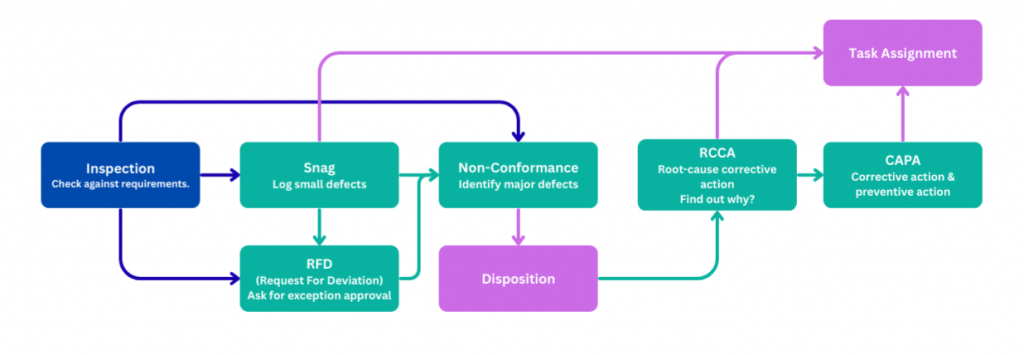
Step 1: Inspection: The Foundation of Quality Control #
Every quality control process starts with inspection.
Inspections verify whether products, materials, or processes meet defined requirements such as:
Technical specifications
Customer requirements
Regulatory or industry standards
Internal quality criteria
Inspections can happen at multiple points:
Incoming materials
In-process production
Final product release
Field or service activities
How software helps #
With Artintech ERP Inspection Forms, inspections are:
Standardized and repeatable
Linked to sales orders, batches, or assets
Fully traceable for audits and reporting
Inspection data becomes structured quality intelligence, not scattered notes.
Step 2: Snag, Capturing Minor Issues Before They Escalate #
Not every issue requires a full non-conformance. This is where snags come in.
A snag is a minor defect or issue identified during inspection that:
Does not immediately block operations
Does not pose a safety or compliance risk
Still requires correction
Common examples include:
Cosmetic defects
Minor dimensional adjustments
Missing labels or markings
Small documentation gaps
Why snag tracking matters #
Organizations that ignore small issues usually face bigger ones later. Capturing snags early:
Prevents rework accumulation
Improves consistency
Strengthens quality culture
How software helps #
The Snag Form in Artintech ERP allows teams to:
Log issues quickly
Link them to inspections
Track closure without unnecessary escalation
This keeps quality proactive instead of reactive.
Step 3: Non-Conformance, When Requirements Are Not Met #
A Non-Conformance (NC) is raised when a product or process fails to meet a defined requirement.
Non-conformances may originate from:
Failed inspections
Customer complaints
Internal audits
Process breakdowns
An NC formally documents:
What requirement was violated
Where and how it occurred
Scope and impact
Immediate containment actions
How software helps #
Using Artintech ERP’s Non-Conformance Form, organizations can:
Standardize NC classification
Maintain audit-ready records
Link issues to root cause and CAPA workflows
This ensures quality decisions are based on evidence, not assumptions.
Step 4: Request for Deviation, Managing Approved Exceptions #
In some cases, a product does not fully meet requirements, but scrapping or reworking is not the best option. A Request for Deviation (RFD) allows organizations to formally approve and control exceptions.
A deviation is:
Intentional and documented
Approved by authorized roles
Time-limited or quantity-limited
Fully traceable
Examples include:
Temporary dimensional tolerance approval
Use-as-is decisions
Temporary process changes
How software helps #
The Request for Deviation Form in Artintech ERP:
Enforces approval workflows
Documents risk and justification
Links deviations back to non-conformances
This eliminates informal approvals that fail audits.
Step 5: Disposition, Deciding What to Do with Non-Conforming Output #
Once a non-conformance is identified, a disposition decision must be made.
Typical disposition options include:
Rework
Repair
Scrap
Return to supplier
Use as is (with deviation approval)
Disposition answers the operational question:
What happens to this product right now?
How software helps #
The Disposition Form in Artintech ERP:
Records decisions and authorizations
Separates immediate actions from long-term improvements
Triggers follow-up tasks automatically
This avoids confusion between fixing the product and fixing the process.
Step 6: RCCA, Identifying Root Causes #
Fixing symptoms is not quality improvement. Root Cause & Corrective Action (RCCA) focuses on why the issue happened and why it was not prevented earlier.
RCCA typically examines:
Process weaknesses
Human factors
Equipment or tooling issues
Training gaps
Control failures
How software helps #
The RCCA Form in Artintech ERP:
Structures root-cause analysis
Links causes to evidence
Connects analysis directly to CAPA planning
This turns investigations into actionable insight.
Step 7: CAPA, Corrective and Preventive Action #
CAPA is where quality control delivers long-term value.
Corrective actions eliminate root causes of existing problems
Preventive actions reduce the likelihood of similar issues elsewhere
Effective CAPAs are:
Clearly defined
Assigned to owners
Time-bound
Verified for effectiveness
How software helps #
With Artintech ERP’s CAPA module, organizations can:
Track actions to completion
Verify effectiveness with evidence
Maintain full traceability from issue to resolution
This is how quality systems mature over time.
Step 8: Task Assignment, Turning Quality Decisions into Action #
Quality processes fail when actions are not owned.
Every inspection finding, correction, or CAPA requires:
Assigned responsibility
Due dates
Status tracking
Visibility
How software helps #
The Task Assignment feature in Artintech ERP:
Links quality actions to real people
Integrates QC tasks into daily operations
Ensures accountability and follow-through
Quality becomes executable, not theoretical.
Why an Integrated QC/QMS Software Matters #
Without an integrated quality management system (QMS), quality workflows become:
Fragmented across emails and spreadsheets
Difficult to audit
Hard to analyze for trends
Dependent on individual discipline
With Artintech ERP, the entire QC process—from Inspection to Snag, Non-Conformance, Deviation, RCCA, CAPA, and Task Assignment—is:
Fully connected
Traceable
Audit-ready
Scalable
This allows organizations to move from reactive quality control to systematic quality improvement.


