
Risk Management Software for Industrial Operations
Identify, assess, and track risks across your organization in one centralized system.
From risk registers to action plan follow-ups, stay in control of operational and compliance risks.
Managing risks with a simple and powerful software to avoid failures and compliance issues.
Managing risks through spreadsheets and disconnected tools creates blind spots, delays action, and increases exposure to operational failures and compliance issues.
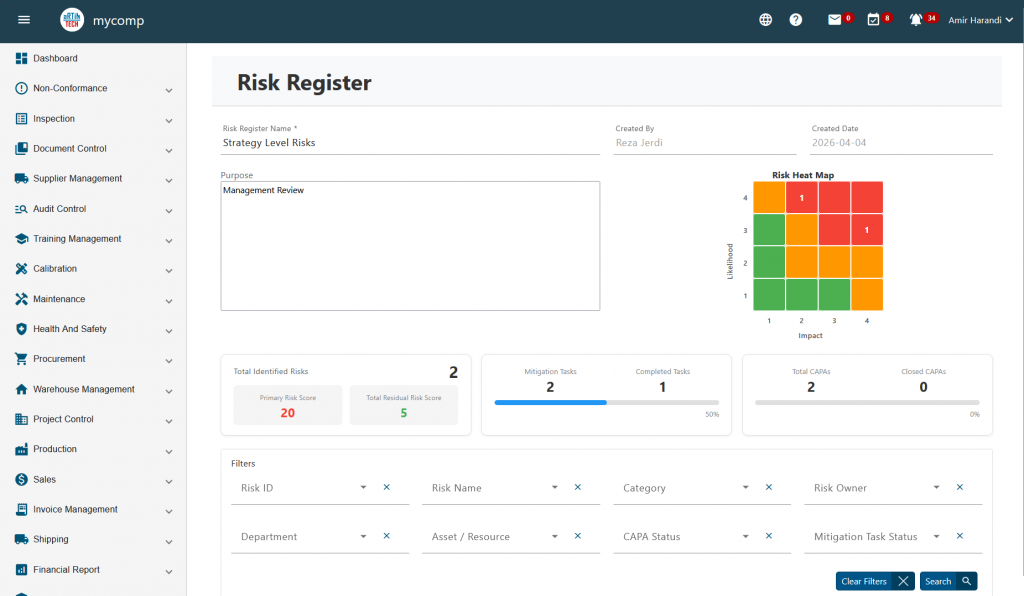
Artintech Risk Management Software provides a structured and centralized approach to risk management. It allows teams to create risk registers, assess risks using standardized scoring, and track mitigation actions with full visibility across the organization.
-
Risk Register Management
Create and manage multiple risk registers across departments, sites, or projects.
-
Centralized Risk Repository
Maintain a complete list of risks with advanced filtering and search capabilities.
-
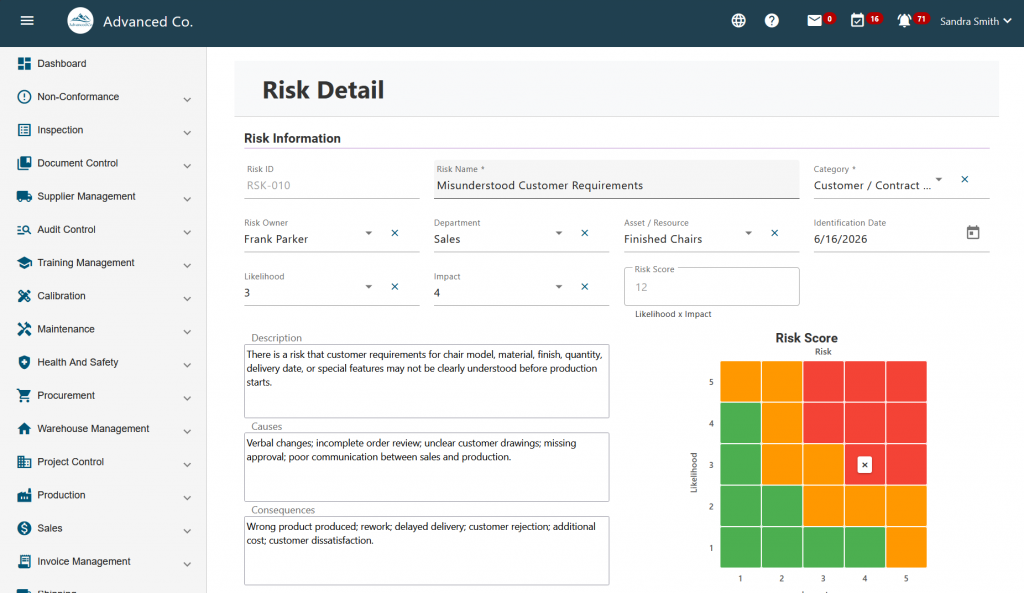
Detailed Risk Profiles
Capture risk description, category, owner, and status in a structured format.
-
Risk Assessment & Scoring
Evaluate risks using likelihood, impact, and severity scoring models.
-
Residual Risk Tracking
Monitor risk levels after mitigation actions are implemented.
-
Risk Plan Follow-up & Status Tracking
Track mitigation plans, assign responsibilities, and monitor progress in real time.
-
Attachments & Documentation
Link supporting documents directly to each risk for full context.
KEY BENEFITS
-
Reduce Operational Risk Exposure
Identify and address risks early before they escalate into costly issues.
-
Improve Decision-Making
Use structured risk data and scoring to prioritize actions effectively.
-
Strengthen Compliance
Align with standards such as ISO 31000 and maintain audit-ready records.
-
Increase Accountability
Assign ownership and track follow-ups for every risk and action plan.
-
Prevent Recurring Issues
Continuously monitor and manage risks to avoid repeated failures.
-
Centralize Risk Data
Eliminate spreadsheets and keep all risk-related information in one system.
HOW IT WORKS
-
Create Risk Registers
Organize risks by department, project, or operational area.
-
Identify and Log Risks
Add risks with detailed descriptions, categories, and ownership.
-
Assess Risks
Score risks based on likelihood and impact to determine severity.
-
Define Action Plans
Assign mitigation tasks and responsible users.
-
Track Progress
Monitor follow-ups and update risk status as actions are completed.
-
Review and Improve
Continuously evaluate residual risk and adjust strategies as needed.
USE CASES / INDUSTRIES
-
Manufacturing
-
Food Manufacturing
-
Automotive & Parts Manufacturing
-
Oil & Gas
-
Pharmaceutical
-
Industrial Services
-
Construction
-
Aerospace & Defense
-
Any compliance-driven organization

Risk Management
- Risk Management Software for Small Manufacturers: Simple Risk Registers That Auditors Respect
- Risk Management Tutorial: Identify, Assess, and Mitigate Risks in Artintech ERP
- Common Risk Management Mistakes That Cause Audit Findings
- How Risk Management Connects with CAPA, Non-Conformance, Audit, and Document Control
- How to Move from Spreadsheet Risk Registers to Risk Management Software
- ISO 9001 Risk-Based Thinking: How to Identify, Assess, and Control Quality Risks
- What Is a Risk Register and Why Does Every Quality Management System Need One?
- What is a Risk Register?
Frequently Asked Questions
Risk Management
What is a risk register?
A risk register is a structured record of identified risks, their causes, potential consequences, risk level, owner, mitigation actions, due dates, status, and review history. It helps organizations track and control risks in a consistent way.
How do you identify quality risks?
Quality risks can be identified through process reviews, audits, customer complaints, non-conformance reports, supplier performance data, training gaps, maintenance records, and employee feedback.
What should be included in a QMS risk register?
A QMS risk register should include the risk name, description, process or department, causes, consequences, severity, likelihood, risk level, risk owner, mitigation actions, due dates, status, review date, and supporting evidence.
How does risk-based thinking connect to CAPA?
CAPA addresses root causes and prevents recurrence. Risk-based thinking helps prioritize issues and identify potential problems before they become non-conformances.
Can I manage a risk register in Excel?
Yes, a small company can start with Excel. However, spreadsheets become difficult to manage when multiple departments, risk owners, due dates, evidence records, audits, and corrective actions are involved. Risk management software provides better control, visibility, and accountability.
What are the problems with spreadsheet risk registers?
Common problems include version control issues, missed deadlines, weak audit trails, inconsistent scoring, poor visibility, and disconnection from CAPA, audits, training, and documents.
When should I move from Excel to risk management software?
You should consider software when your risk register becomes difficult to update, review, control, or defend during audits.
How does risk management software improve audit readiness?
Risk management software helps keep risk records centralized, updated, assigned, and traceable. It can support audit readiness by showing risk assessments, action plans, owners, due dates, review history, and evidence of completed mitigation actions.
How can software support ISO 9001 risk management?
Software can centralize risk records, assign owners, track actions, maintain evidence, connect risks to CAPA and audits, and provide better visibility for management.
What is ISO 9001 risk-based thinking?
ISO 9001 risk-based thinking means identifying and addressing risks and opportunities that may affect the quality management system, customer satisfaction, compliance, or process performance.
Is a risk register required for ISO 9001?
ISO 9001 requires organizations to consider risks and opportunities as part of their quality management system. The standard does not force every company to use the same format, but a risk register is one of the most practical ways to document and manage risk-based thinking.
Risk Management Integration
How does risk management connect with CAPA?
Risk management helps prioritize CAPA by identifying which issues have the highest potential impact. CAPA actions can also reduce risk levels when they are completed and verified.
Should non-conformances be linked to risk records?
Yes. Serious or recurring non-conformances should be reviewed against the risk register to determine whether the risk was known, underestimated, or not properly controlled.
How do audits support risk management?
Audits identify weaknesses in processes, controls, records, training, and documentation. These findings can be used to update risk records and assign mitigation actions.
Why is document control important for risk management?
Uncontrolled or outdated documents can create process errors, inconsistent work, audit findings, and non-conformances. Document control reduces this risk.
Why use integrated QMS software?
Integrated QMS software connects risks, CAPA, audits, non-conformances, documents, training, calibration, and supplier quality so the organization can manage quality more effectively.
Risk Management Mistakes
What risk management mistakes cause audit findings?
Common mistakes include outdated risk registers, unclear owners, inconsistent scoring, overdue actions, missing evidence, and no link between risk management and CAPA.
Can an outdated risk register create an audit finding?
Yes. If the risk register is not reviewed or updated, auditors may question whether risk management is active and effective.
How often should risks be reviewed before an audit?
High risks should be reviewed frequently. All major risks should be reviewed before audits, after process changes, after complaints, and after significant non-conformances.
How does software help reduce audit findings?
Software helps centralize records, assign owners, send reminders, track actions, link evidence, and connect risks with CAPA, audits, documents, training, and calibration.
What evidence should be available for risk management audits?
Evidence may include risk records, review history, mitigation actions, training records, audit reports, CAPA records, calibration records, supplier assessments, and updated procedures.
Best Matching Modules
Most of our clients match this module with the modules below to best optimize their business processes.

Knowledge Base
- How to Prepare for an ISO 9001 Audit Without the Spreadsheet Chaos
- Common Risk Management Mistakes That Cause Audit Findings
- How Risk Management Connects with CAPA, Non-Conformance, Audit, and Document Control
- How to Move from Spreadsheet Risk Registers to Risk Management Software
- Quality Control Workflow Explained: From Inspection to CAPA
- ISO 9001 Standards and the Role of Artintech ERP in Achieving Compliance
- What Is a Quality Management System (QMS)?
- How to Boost Compliance Management with a Reliable Calibration Management System
- Risk Management Software for Small Manufacturers: Simple Risk Registers That Auditors Respect
- Risk Management Tutorial: Identify, Assess, and Mitigate Risks in Artintech ERP
- Common Risk Management Mistakes That Cause Audit Findings
- How Risk Management Connects with CAPA, Non-Conformance, Audit, and Document Control
- How to Move from Spreadsheet Risk Registers to Risk Management Software
- ISO 9001 Risk-Based Thinking: How to Identify, Assess, and Control Quality Risks
- What Is a Risk Register and Why Does Every Quality Management System Need One?
- What is a Risk Register?
90 days free trial! No credit card required.
Start streamlining your processes!
Get started with Artintech today and streamline your business operations. Sign up now to achieve your business goals with our powerful suite of modules.